Owner & Founder
Date Published: 12/18/2025

Voice search is basically when people talk to their devices instead of typing because, let’s face it, talking takes less effort than lifting a finger. Think of it as the lazy sibling of traditional search. But here’s the catch: people don’t talk like they’re composing a formal email. They ask things like, “What’s the best pizza near me?” or “How do I fix a clogged sink without calling my dad?” It’s casual, conversational, and often weirdly specific.
Your website has to keep up with this chatty, no-nonsense style. Optimizing for voice search is all about quick answers to real-life questions, not impressing anyone with fancy words or tech jargon. So, unless your audience is the robots taking over the planet, make sure your content gets what people mean when they talk, not just what they say. It’s less “search engine optimization” and more “I know what you’re really asking, Karen.”

People don’t use voice search like they’re applying for a job at a law firm—they use it like they’re texting their best friend at midnight. It’s casual, it’s to the point, and sometimes it’s downright awkward. “Why is my dog sneezing?” or “best pizza delivery that’s open now” are the types of things people blurt out when talking to their devices. Your content needs to vibe with that energy.
To make it work, write the way people actually talk. Think “chat over coffee” rather than “lecture at a seminar.” Keep it simple, direct, and a little conversational. If you wouldn’t say it out loud in a normal conversation, it probably doesn’t belong in your content. Seriously, when was the last time you dropped the phrase “utilize” in a chat? Exactly.
And while you’re at it, skip the fluff. People aren’t using voice search to get a full novel—they want fast, clear answers that don’t make them feel like they’ve wandered into an encyclopedia. If your content has too much jargon or reads like a PhD dissertation, you’re doing it wrong.
Marketing pro tip: Read your content out loud. If it sounds like a human, you’re golden. If it sounds like a bot, well, maybe consider a rewrite. Or switch careers and start writing for robots.

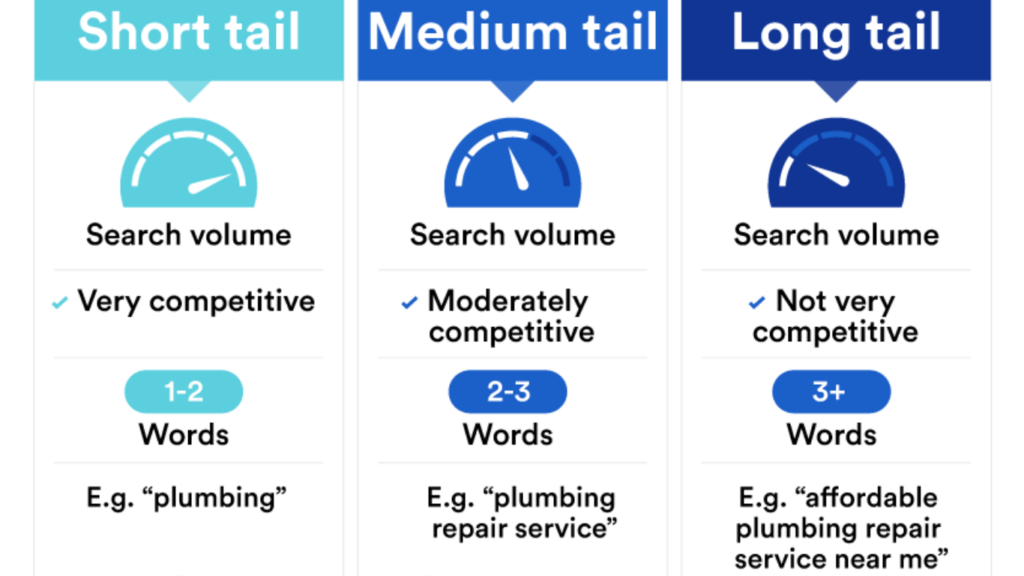
Keywords are the secret sauce for optimizing for voice search success, but here’s the thing—short ones are as useful as a screen door on a submarine. People don’t just say “pizza” or “plumber” into their devices. They spill their oddly specific, borderline embarrassing needs: “best thin crust pepperoni pizza near me open late” or “emergency plumber for burst pipe that won’t stop gushing.” These are the long-tail keywords you want to focus on—specific, human, and incredibly useful for capturing the questions people are too panicked to type out.
Long-tail keywords help you zero in on what your audience is actually looking for, not just the vague idea of it. You’re basically getting into their heads, but, like, in a non-creepy way. It’s not rocket science—just think about what you’d say out loud when you’re talking to your smart speaker. Spoiler: It’s probably not a single word or a generic phrase. It’s the whole messy, relatable question you’d never admit to typing.
Now, finding these gems? That’s where keyword tools come in. No, they’re not just sitting there collecting virtual dust. Crack one open and start hunting for those conversational phrases that match how real humans talk. If you stumble across something that makes you cringe a little—like “how to unclog a toilet with a wire hanger”—that’s probably the golden ticket.
And when optimizing for voice search don’t forget, these ultra-specific phrases mean you’re competing with fewer people for the same search. Translation: your chances of showing up in search results go way up. So, grab your coffee, fire up a keyword tool, and start digging. It’s basically detective work, but instead of solving crimes, you’re solving the mystery of how to get people to find you online.

(Report Available Only for United States Based Companies.)
Let’s be real, people aren’t using voice search to find stuff halfway across the country. They’re looking for what’s right around the corner. You know, the “pizza place near me that doesn’t judge me for ordering extra cheese again” kind of thing. If your business isn’t showing up in these local searches, you’re basically the best-kept secret nobody asked for.
First things first: claim your spot on Google My Business. It’s like planting your flag in the digital world, saying, “Hey, I exist, and I’m ready to serve you overpriced coffee or fix your leaky sink.” Fill out every single detail—business hours, address, phone number, even photos. Trust me, the more info you give, the more likely you are to show up when someone’s voice assistant is scrambling to find options.
Next, reviews. They’re the modern version of word-of-mouth, except now people can decide whether to trust you based on a random comment from “Susan B.” You want glowing reviews, not the kind where someone drags you for forgetting extra ketchup. So, don’t be shy—ask your happy customers to leave you a review. Bribing them with a discount or freebie? We won’t tell if you don’t.
And don’t forget to keep your info consistent everywhere—your website, social media profiles, and any online directories. If your hours are wrong or your phone number sends people to your old high school friend, good luck winning back trust.
Oh, when optimizing for voice search, sprinkle some location-based keywords throughout your site, but don’t overdo it. Nobody wants to read, “Best tacos in Springfield, the Springfield taco expert, for all your Springfield taco needs” in every other sentence. Keep it natural, or as natural as you can while subtly yelling, “I’M LOCAL!” into the void of the internet.

Let’s face it—no one’s sticking around for a website that loads slower than a grandma typing a text message. When people use voice search, they expect lightning-fast results, not a buffering symbol they can practically hear mocking them. If your site is dragging, you’re not just losing visitors—you’re practically handing them over to your competitors with a smile and a gift basket.
First, check your images. Are they massive files that look ready to be printed on a billboard? Shrink them down. You don’t need crystal-clear clarity to show off a stock photo of a salad. Compress those files like your life depends on it (or at least your bounce rate does). While you’re at it, make sure your hosting isn’t the digital equivalent of a 90s landline. Upgrade to something that doesn’t break a sweat when someone actually visits your site.
Next up: caching. Sounds fancy, but it’s basically telling your website, “Hey, remember this so you don’t have to keep starting from scratch every time someone visits.” It’s like meal-prepping for your site—it saves time and effort in the long run. And please, ditch any clunky plugins you’re hoarding. If you’re running a dozen unnecessary add-ons, your site’s speed is paying the price. You don’t need a plugin for every little thing. Think quality, not quantity.
Lastly, don’t forget about the technical stuff like minifying code. It sounds nerdy because it is, but trimming the digital fat from your JavaScript and CSS can make a world of difference. If that sentence made your brain hurt, call an optimized web design pro to handle it. Just don’t ignore it—it’s the equivalent of putting duct tape on a leaky pipe and hoping for the best.

Let’s talk about mobile users—aka the people who are glued to their phones 24/7. If your website isn’t mobile friendly, it’s like opening a store but locking the front door. Frustrating, right? A mobile-friendly site isn’t just a “nice-to-have” anymore; it’s the bare minimum. Most voice searches happen on phones, so if your site doesn’t work on a screen smaller than your laptop, you’re pretty much out of the game before it starts.
Step one: make sure your site design adjusts to fit any screen size. It’s called responsive design, but let’s just call it “not annoying design.” Nobody wants to pinch and zoom their way through your site like they’re reading an ancient scroll. Your pages should automatically resize, reposition, and generally look awesome whether someone’s on a tablet, phone, or whatever weird gadget comes out next.
Step two: simplify your navigation. Don’t make people dig through a digital maze to find your contact info or product listings. Think easy-to-tap menus with big, clear buttons. And yes, I mean buttons big enough for human thumbs, not buttons designed for elves. Seriously, if people keep accidentally clicking on the wrong thing, they’re going to rage-quit your site and never look back.
And let’s not forget page speed. If your mobile site takes ages to load, you might as well hand out carrier pigeons with your contact details. Mobile users are impatient—they expect snappy results and smooth scrolling. So, test your site on a phone, then fix whatever’s lagging.
Bottom line: your mobile site should make visitors want to stick around, not throw their phones out the window. Get it right, and you’ll turn casual searchers into loyal customers faster than you can say, “Wait, why doesn’t this button work?”
By following the information, you have learned today, optimizing for voice search should not be too difficult. On top of optimizing for voice search on your website, properly managing your social media actually plays a factor in optimization in whole. For more online marketing tips, please check out our blog HERE.
To learn more about optimizing for voice search as well as search engine optimization in whole, be sure to read our following related articles (if you own a business located in the United States, you can book a free consultation below). Also, don’t forget to check out our most asked questions and answers about optimizing for voice search.
Voice search relies on spoken commands, enabling users to find information hands-free. This technology uses advanced natural language processing to interpret questions and deliver relevant results. Virtual assistants like Siri, Alexa, and Google Assistant power these searches, offering a convenient way for people to access information.
With the rise of smart devices, voice search is becoming an integral part of how users interact with the digital world. This shift in behavior underscores the need for businesses to adjust their approach, as voice searches often feature conversational phrasing. By aligning digital strategies with how users communicate naturally, businesses can better meet the demands of this growing trend and remain competitive in an evolving search landscape.

Optimizing for voice search allows businesses to tap into the growing number of users relying on voice-activated technology for quick answers. Many voice searches focus on local needs, such as finding nearby businesses or checking hours, which can drive foot traffic and engagement. By tailoring content to conversational queries, businesses can improve visibility in search results and better connect with potential customers.
Voice search optimization also provides an affordable alternative to costly advertising methods, enabling businesses to enhance their online presence without a large investment. Ensuring content addresses specific, spoken questions and uses natural phrasing makes it more accessible to users, fostering stronger connections and meeting customer expectations in a rapidly evolving digital landscape.
To make content more compatible with voice search, prioritize answering specific questions users are likely to ask. Using a natural tone and conversational phrases helps align with how people speak during voice searches. Include long-tail keywords that reflect common queries, such as “how do I” or “what’s the best way to.”
Structuring content in a Q&A format or creating concise, direct answers improves its relevance for voice search results. Additionally, focus on creating content that provides value and addresses user intent, ensuring it delivers clear, actionable information that search engines can easily understand and present to voice search users.
Ensuring your website is optimized for mobile devices is essential, as many voice searches occur on smartphones. Use structured data markup to help search engines better understand your content and improve its chances of appearing in voice search results. Prioritize site speed by compressing images, reducing unnecessary scripts, and utilizing a reliable hosting service.
Regularly update your business information, such as hours and contact details, across your website and online directories. These technical improvements make your site more accessible and align with the requirements of voice-activated search technologies, improving its performance and visibility in search results.
Many wonder how to begin optimizing for voice search without overspending. Start with simple steps like refining metadata, ensuring your site is mobile-friendly, and crafting content with natural language. Addressing common voice queries with clear, concise answers boosts visibility over time. Gradual improvements, such as using structured data and enhancing site speed, further enhance performance. Voice search optimization doesn’t require significant resources to make an impact; small, consistent efforts can lead to measurable results in connecting with your audience.